Roll over image to zoom in
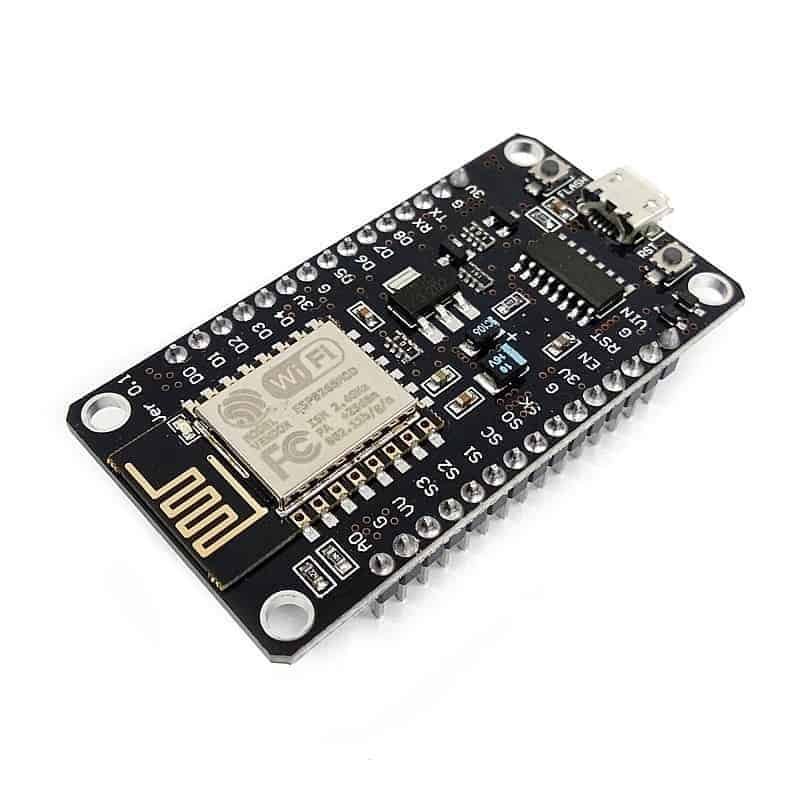
NodeMCU ESP8266 Wi-Fi Module V3 (CH340)
$ 1.91
NodeMCU ESP8266 Wi-Fi Module V3 (CH340) – Overview The NodeMCU ESP8266 Wi-Fi Module V3 with CH340 is a compact development board designed for IoT, home automation, and sensor-based projects. It combines the popular ESP8266 system-on-chip with a CH340 USB-to-UART bridge for easy USB programming and power. The board is breadboard-friendly and ready for rapid prototyping using the Arduino IDE or NodeMCU Lua firmware. Why choose this ESP8266 Wi-Fi Module This NodeMCU board is chosen by makers, students, and engineers for its low cost, wide software support, and reliable Wi-Fi connectivity. The CH340 USB interface simplifies setup on Windows, macOS, and Linux (CH340 driver may be required on some systems). With built-in Wi-Fi client, access point, and server modes, the module is ideal for connected devices and remote monitoring. Key Features ESP8266 Wi-Fi System-on-Chip with 80/160 MHz CPU speed CH340 USB-to-serial chip for plug-and-play USB programming and power Breadboard-friendly 30-pin layout with female headers Onboard 3.3V regulator; micro USB power input (5V via USB regulated to 3.3V) Approximately 4MB flash memory (module-dependent) Interfaces: ADC (1), PWM, I2C, SPI, UART Supports Wi-Fi STA, AP, and Server modes for flexible connectivity Technical Specifications SoC: Espressif ESP8266 USB Interface: CH340 USB-to-UART bridge Operating Voltage: 3.3V (powered via micro USB and onboard regulator) Flash Memory: ~4MB (varies by module) GPIO: Multiple digital I/O pins with PWM, I2C, SPI, UART support Analog: 1 x ADC input Programming: Arduino IDE, NodeMCU/Lua firmware, or AT commands Common Use Cases Home automation – control relays, lights, smart plugs and sensors over Wi-Fi IoT sensor nodes – send temperature, humidity, air quality or motion data to cloud services Prototyping – build Wi-Fi-enabled proof-of-concept devices quickly Education and learning – great for students and hobbyists using Arduino or Lua Remote monitoring and simple web servers for device control and diagnostics Getting Started with NodeMCU ESP8266 V3 Install CH340 drivers if your operating system requires them. Open Arduino IDE and select the board: NodeMCU 1.0 (ESP8266). Connect the board to your PC using a micro USB cable and select the correct COM port. Install ESP8266 boards package via Boards Manager and required libraries (WiFi, ESPAsyncWebServer, etc.). Upload a simple Wi-Fi example to connect to your network or run a small web server for testing. Quick start tip Enable OTA updates during development to update firmware wirelessly once the board is on the network. Tips and Best Practices Always operate I/O at 3.3V – the GPIO pins are not 5V tolerant. Use proper level shifting when interfacing with 5V sensors or modules. If powering external peripherals, verify the board regulator can supply the required current or use a separate 3.3V supply. Keep power and ground connections short and use decoupling capacitors for stability where needed. Compatibility and Community The NodeMCU ESP8266 V3 is compatible with Arduino IDE, NodeMCU/Lua firmware, and many third-party libraries. A large community provides tutorials, sample projects, and libraries to accelerate development for IoT and home automation projects. Conclusion Whether you are building a connected sensor, a home automation controller, or learning embedded development, the NodeMCU ESP8266 Wi-Fi Module V3 with CH340 offers a strong balance of features, affordability, and community support to get your project online quickly. Categories: Boards, Modules and Accessories, Boards and Programmers Tags: Arduino IDE, CH340, ESP8266 Module, IoT development, microcontroller, NodeMCU V3, Wi-Fi Module College Road Electronics 4.81 (575 Reviews)